Fill in Your Arizona 140A Form
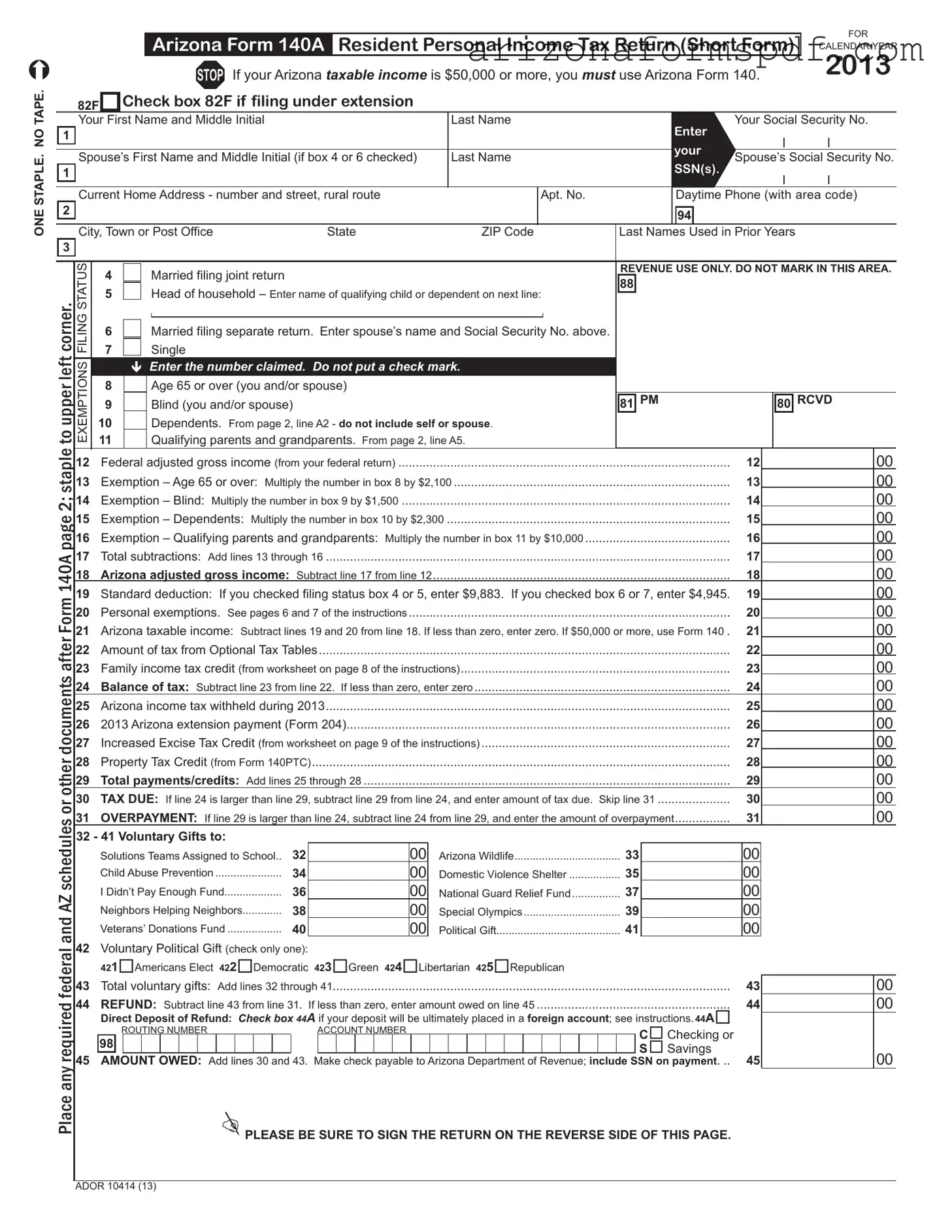
The Arizona Form 140A, known as the Resident Personal Income Tax Return (Short Form), serves as a simplified method for Arizona residents to file their state income taxes for the calendar year 2013, provided their taxable income is under $50,000. This form accommodates various filing statuses including single, married filing jointly, married filing separately, and head of household, allowing taxpayers to claim exemptions for age (65 or over), blindness, dependents, and qualifying parents or grandparents, reflecting these conditions through specific calculations to determine the Arizona adjusted gross income. Essential elements such as federal adjusted gross income, standard deductions, and personal exemptions are accounted for to ascertain the Arizona taxable income. Moreover, it integrates sections for tax calculations, credits like the Family Income Tax Credit and Property Tax Credit, and optional tax tables, along with provisions for direct tax payments or refunds. Opportunities to contribute to charitable causes and political gifts are also featured, with clear instructions for taxpayers wishing to allocate part of their return to these ends. The form meticulously outlines the required information for dependents and qualifying relatives, emphasizing accuracy and completeness under penalty of perjury, concluding with a segment for the taxpayer's declaration, and if applicable, the declaration by a paid preparer.
Document Preview
Arizona Form 140A Resident Personal Income Tax Return (Short Form)
STOP If your Arizona taxable income is $50,000 or more, you must use Arizona Form 140.
FOR
CALENDAR YEAR
2013
ONE STAPLE. NO TAPE.
1
1
2
3
or other documents after Form 140A page 2; staple to upper left corner.
|
82F |
|
Check box 82F if filing under extension |
|
|
|
|
|
|
|
|
|
|
|
|
|
|
|
|
|
||||||
|
Your |
First Name and Middle Initial |
|
|
Last Name |
|
|
Enter |
|
Your Social Security No. |
|
|||||||||||||||
|
|
|
|
|
|
|
|
|
|
|
|
|
|
|
|
|
|
|
|
|
|
|
|
|
||
|
|
|
|
|
|
|
|
|
|
|
|
|
|
|
|
|
your |
|
|
|
|
|
|
|
|
|
|
|
|
|
|
|
|
|
|
|
|
|
|
|
|
|
|
|
|
|
|
|
|
|
|
||
|
Spouse’s First Name and Middle Initial (if box 4 or 6 checked) |
|
Last Name |
|
Spouse’s Social Security No. |
|||||||||||||||||||||
|
|
|
|
SSN(s) |
. |
|||||||||||||||||||||
|
|
|
|
|
|
|
|
|
|
|
|
|
|
|
|
|
|
|
|
|
|
|
|
|||
|
|
|
|
|
|
|
|
|
|
|
|
|
|
|
|
|
|
|
|
|
|
|
|
|||
|
Current Home Address - number and street, rural route |
|
|
|
Apt. No. |
|
|
|
|
Phone (with area code) |
|
|||||||||||||||
|
|
|
|
|
|
Daytime |
|
|||||||||||||||||||
|
|
|
|
|
|
|
|
|
|
|
|
|
|
|
|
|
|
|
|
|
|
|
|
|
|
|
|
City, Town or Post Office |
State |
|
ZIP Code |
|
|
|
|
94 |
|
|
|
|
|
|
|
|
|
||||||||
|
|
|
|
|
|
|
|
|
|
|
|
|
|
|
|
|||||||||||
|
|
|
|
|
Last Names |
Used in Prior Years |
|
|||||||||||||||||||
|
|
|
|
|
|
|
|
|
|
|
|
|
|
|
|
|
|
|
|
|
|
|
|
|
|
|
STATUS |
|
4 |
|
|
|
|
Married filing joint return |
|
|
|
|
|
|
REVENUE USE ONLY. DO NOT MARK IN THIS AREA. |
||||||||||||
|
|
|
|
|
|
|
|
|
|
|
||||||||||||||||
|
|
|
|
|
|
|
|
|
|
|
88 |
|
|
|
|
|
|
|
|
|
|
|
||||
FILING |
|
5 |
|
|
|
|
Head of household – Enter name of qualifying child or dependent on next line: |
|
|
|
|
|
|
|
|
|
|
|
||||||||
|
|
|
|
|
|
|
|
|
|
|
|
|
|
|
|
|||||||||||
|
|
|
|
|
|
|
|
|
|
|
|
|
|
|
|
|
||||||||||
|
6 |
|
|
|
|
|
|
|
|
|
|
|
|
|
|
|
|
|
|
|
|
|
|
|
||
|
|
|
|
|
Married filing separate return. Enter spouse’s name and Social Security No. above. |
|
|
|
|
|
|
|
|
|
|
|
|
|||||||||
|
|
|
|
|
|
|
|
|
|
|
|
|
|
|
|
|
||||||||||
|
|
|
7 |
|
|
|
|
Single |
|
|
|
|
|
|
|
|
|
|
|
|
|
|
|
|
|
|
|
|
|
|
|
|
|
|
|
|
|
|
|
|
|
|
|
|
|
|
|
|
|
|
|
||
|
|
|
|
|
|
|
|
|
|
|
|
|
|
|
|
|
|
|
|
|
|
|
|
|
|
|
ExEMPTIONS |
|
|
|
Enter the number claimed. Do not put a check mark. |
|
|
|
|
|
|
|
|
|
|
|
|
||||||||||
|
8 |
|
|
|
|
Age 65 or over (you and/or spouse) |
|
|
|
|
|
|
|
|
|
|
|
|
|
|
|
|
|
|||
|
|
|
9 |
|
|
|
|
Blind (you and/or spouse) |
|
|
|
|
|
|
|
PM |
|
|
|
RCVD |
|
|||||
|
|
|
|
|
|
|
|
|
|
|
|
|
81 |
|
|
80 |
|
|||||||||
|
|
10 |
|
|
|
|
Dependents. From page 2, line A2 - do not include self or spouse. |
|
|
|
|
|
|
|
|
|
|
|
|
|||||||
|
|
11 |
|
|
|
|
Qualifying parents and grandparents. From page 2, line A5. |
|
|
|
|
|
|
|
|
|
|
|
|
|||||||
12 |
|
................................................................................................Federal adjusted gross income (from your federal return) |
|
|
|
|
|
|
|
|
|
12 |
|
|
|
|
|
00 |
||||||||
13 |
|
Exemption – Age 65 or over: Multiply the number in box 8 by $2,100 |
|
|
|
|
|
13 |
|
|
|
|
|
00 |
||||||||||||
14 |
|
Exemption – Blind: Multiply the number in box 9 by $1,500 |
|
|
|
|
|
|
|
|
|
14 |
|
|
|
|
|
00 |
||||||||
15 |
|
Exemption – Dependents: Multiply the number in box 10 by $2,300 |
|
|
|
|
|
|
|
|
|
15 |
|
|
|
|
|
00 |
||||||||
16 |
|
Exemption – Qualifying parents and grandparents: Multiply the number in box 11 by $10,000 |
|
|
|
|
|
16 |
|
|
|
|
|
00 |
||||||||||||
17 |
|
Total subtractions: Add lines 13 through 16 |
..................................................................................................................... |
|
|
|
|
|
|
|
|
|
17 |
|
|
|
|
|
00 |
|||||||
18 |
|
Arizona adjusted gross income: Subtract line 17 from line 12 |
|
|
|
|
|
|
|
|
|
18 |
|
|
|
|
|
00 |
||||||||
19 |
|
Standard deduction: If you checked filing status box 4 or 5, enter $9,883. If you checked box 6 or 7, enter $4,945. |
19 |
|
|
|
|
|
00 |
|||||||||||||||||
20 |
|
Personal exemptions. See pages 6 and 7 of the instructions |
|
|
|
|
|
|
|
|
|
20 |
|
|
|
|
|
00 |
||||||||
21 |
|
Arizona taxable income: Subtract lines 19 and 20 from line 18. If less than zero, enter zero. If $50,000 or more, use Form 140 . |
21 |
|
|
|
|
|
00 |
|||||||||||||||||
22 |
|
Amount of tax from Optional Tax Tables |
|
|
|
|
|
|
|
|
|
|
22 |
|
|
|
|
|
00 |
|||||||
23 |
|
Family income tax credit (from worksheet on page 8 of the instructions) |
|
|
|
|
|
23 |
|
|
|
|
|
00 |
||||||||||||
24 |
|
Balance of tax: Subtract line 23 from line 22. If less than zero, enter zero |
|
|
|
|
|
24 |
|
|
|
|
|
00 |
||||||||||||
25 |
|
Arizona income tax withheld during 2013 |
..................................................................................................................... |
|
|
|
|
|
|
|
|
|
25 |
|
|
|
|
|
00 |
|||||||
26 |
|
2013 Arizona extension payment (Form 204) |
|
|
|
|
|
|
|
|
|
26 |
|
|
|
|
|
00 |
||||||||
27 |
|
Increased Excise Tax Credit (from worksheet on page 9 of the instructions) |
|
|
|
|
|
27 |
|
|
|
|
|
00 |
||||||||||||
28 |
|
Property Tax Credit (from Form 140PTC) |
|
|
|
|
|
|
|
|
|
|
28 |
|
|
|
|
|
00 |
|||||||
29 |
|
Total payments/credits: Add lines 25 through 28 |
|
|
|
|
|
|
|
|
|
29 |
|
|
|
|
|
00 |
||||||||
30 |
|
TAX DUE: If line 24 is larger than line 29, subtract line 29 from line 24, and enter amount of tax due. Skip line 31 |
30 |
|
|
|
|
|
00 |
|||||||||||||||||
31 |
|
OVERPAYMENT: If line 29 is larger than line 24, subtract line 24 from line 29, and enter the amount of overpayment |
31 |
|
|
|
|
|
00 |
|||||||||||||||||
and AZ schedules
32 - 41 Voluntary Gifts to: |
|
Solutions Teams Assigned to School.. |
32 |
Child Abuse Prevention |
34 |
I Didn’t Pay Enough Fund |
36 |
Neighbors Helping Neighbors |
38 |
Veterans’ Donations Fund |
40 |
42Voluntary Political Gift (check only one):
00
00
00
00
00
Arizona Wildlife |
33 |
Domestic Violence Shelter |
35 |
National Guard Relief Fund |
37 |
Special Olympics |
39 |
Political Gift |
41 |
00
00
00
00
00
Place any required federal
|
421Americans Elect 422Democratic 423Green 424Libertarian 425Republican |
|
|
|
|
|||||||||||||||||||||||||||||
43 |
Total voluntary gifts: Add lines 32 through 41 |
43 |
|
00 |
||||||||||||||||||||||||||||||
44 |
REFUND: Subtract line 43 from line 31. |
If less than zero, enter amount owed on line 45 |
44 |
|
00 |
|||||||||||||||||||||||||||||
|
Direct Deposit of Refund: Check box 44A if your deposit will be ultimately placed in a foreign account; see instructions. 44A |
|
|
|
||||||||||||||||||||||||||||||
|
|
ROUTING NUMBER |
|
ACCOUNT NUMBER |
C Checking or |
|
|
|
||||||||||||||||||||||||||
|
98 |
|
|
|
|
|
|
|
|
|
|
|
|
|
|
|
|
|
|
|
|
|
|
|
|
|
|
|
|
|
|
|
|
|
45 |
|
|
|
|
|
|
|
|
|
|
|
|
|
|
|
|
|
|
|
|
|
|
|
|
|
|
|
|
|
S Savings |
45 |
|
00 |
|
AMOUNT OWED: Add lines 30 and |
43. Make check payable to Arizona Department of Revenue; include SSN on payment |
|
||||||||||||||||||||||||||||||||
PLEASE BE SURE TO SIGN THE RETURN ON THE REVERSE SIDE OF THIS PAGE.
ADOR 10414 (13)
Your Name (as shown on page 1)
Your Social Security No.
PART A: Dependents, Qualifying Parents and Grandparents – do not list yourself or spouse
A1 List children and other dependents. |
If more space is needed, attach a separate sheet. |
|
|
||
|
NO. OF MONTHS LIVED |
||||
|
FIRST AND LAST NAME |
SOCIAL SECURITY NO. |
RELATIONSHIP |
|
IN YOUR HOME IN 2013 |
|
|
|
|
|
|
|
|
|
|
|
|
|
|
|
|
|
|
|
|
|
|
|
|
|
|
|
|
|
|
|
|
|
|
|
|
|
|
|
|
|
|
|
|
|
|
|
|
|
|
|
|
|
|
|
|
|
|
|
|
|
|
|
|
|
|
|
|
|
|
|
|
|
|
|
|
|
|
|
|
|
|
|
|
|
|
|
|
|
|
|
|
|
|
|
|
|
|
|
|
|
|
|
|
A2 |
Enter total number of persons listed in A1 here and on the front of this form, box 10 |
TOTAL A2 |
|
|||||||||
A3 |
a Enter the names of the dependents listed above who do not qualify as your dependent on your federal return. See |
|
||||||||||
|
|
page 6 of the instructions. |
|
|
|
|
|
|
|
|
|
|
|
|
|
|
|
|
|
||||||
|
b Enter dependents listed above who were not claimed on your federal return due to education credits: |
|||||||||||
A4 |
|
|
|
|
|
|
|
|
||||
List qualifying parents and grandparents. If more space is needed, attach a separate sheet. |
|
|
|
|
||||||||
|
You cannot list the same person here and also on line A1. For information on who is a |
|
|
|
|
|||||||
|
qualifying parent or grandparent, see page 6 of the instructions. |
|
|
NO. OF MONTHS LIVED |
||||||||
|
FIRST AND LAST NAME |
SOCIAL SECURITY NO. |
RELATIONSHIP |
IN YOUR HOME IN 2013 |
||||||||
|
|
|
|
|
|
|
|
|
|
|
|
|
|
|
|
|
|
|
|
|
|
|
|
|
|
A5 Enter total number of persons listed in A4 here and on the front of this form, box 11 |
TOTAL |
A5
PLEASE SIGN HERE
I have read this return and any attachments with it. Under penalties of perjury, I declare that to the best of my knowledge and belief, they are true, correct and complete. Declaration of preparer (other than taxpayer) is based on all information of which preparer has any knowledge.
|
|
|
|
|
|
|
|
YOUR SIGNATURE |
|
|
|
DATE |
|
OCCUPATION |
|
|
|
|
|
|
|
|
|
SPOUSE’S SIGNATURE |
|
|
|
DATE |
|
SPOUSE’S OCCUPATION |
|
|
|
|
|
|
|
||
|
PAID PREPARER’S SIGNATURE |
|
DATE |
|
FIRM’S NAME (PREPARER’S IF |
||
PAID PREPARER’S STREET ADDRESSPAID PREPARER’S TIN
|
|
|
( |
) |
|
PAID PREPARER’S CITY |
STATE |
ZIP CODE |
|
PAID PREPARER’S PHONE NO. |
|
If you are sending a payment with this return, mail to Arizona Department of Revenue, PO Box 52016, Phoenix, AZ,
If you are expecting a refund or owe no tax, or owe tax but are not sending a payment, mail to Arizona Department of Revenue, PO Box 52138, Phoenix, AZ,
ADOR 10414 (13) |
AZ Form 140A (2013) |
Page 2 of 2 |
File Properties
| Fact Name | Description |
|---|---|
| Form Type | Arizona Form 140A Resident Personal Income Tax Return (Short Form) |
| Eligibility Criteria | Only for individuals with Arizona taxable income less than $50,000 |
| Year Specific | Designed for the calendar year 2013 |
| Extension Filing | Check box 82F if filing under extension |
| Filing Statuses Available | Single, Married filing jointly, Married filing separately, Head of household |
| Exemptions | Age 65 or over, Blind, Dependents, Qualifying parents and grandparents |
| Income Adjustment | Subtractions based on exemptions to determine Arizona adjusted gross income |
| Standard Deduction Amounts | $9,883 for filing status 4 or 5, $4,945 for filing status 6 or 7 |
| Tax Credits | Family income tax credit, Increased Excise Tax Credit, Property Tax Credit |
| Voluntary Contributions | Options to contribute to various state funds and political parties |
| Payment and Refund Details | Instructions for direct deposit of refunds and addressing payments owed |
| Governing Law | Arizona Revised Statutes |
Instructions on Writing Arizona 140A
Once you have gathered all necessary information, including your federal return and any documents related to tax payments or deductions, you can begin filling out the Arizona Form 140A for your Resident Personal Income Tax Return. This simplified process is designed for residents whose Arizona taxable income is less than $50,000. Carefully follow each step to ensure accuracy and compliance with state tax regulations. Your attention to detail will simplify the process, ensuring that your tax return is processed efficiently.
- Check box 82F only if you're filing under an extension.
- Enter your first name, middle initial, and last name.
- Provide your Social Security Number (SSN).
- If applicable, enter your spouse’s first name, middle initial, and last name in the designated area.
- Include your spouse’s Social Security Number if you are filing a joint return or a married filing separate return.
- Provide your current home address, including apartment number if applicable.
- Enter your daytime phone number with the area code.
- Specify your filing status by checking the appropriate box (4 for married filing jointly, 5 for head of household, 6 for married filing separately, 7 for single).
- For exemptions, enter the number of individuals older than 65 (box 8), individuals who are blind (box 9), and dependents, not including yourself or your spouse (box 10).
- If claiming qualifying parents or grandparents, enter the total from page 2, line A5 in box 11.
- Input your federal adjusted gross income in box 12.
- Calculate exemptions for age 65 or over, blind, dependents, and qualifying parents or grandparents (boxes 13 through 16) using the specified multipliers.
- Add lines 13 through 16 for total subtractions and enter this amount in box 17.
- Subtract line 17 from line 12 to find your Arizona adjusted gross income, and enter this amount in box 18.
- Determine your standard deduction based on your filing status and enter the amount in box 19.
- Enter your personal exemptions in box 20 as directed in the instructions.
- Calculate your Arizona taxable income, subtract lines 19 and 20 from line 18, and enter this in box 21.
- Refer to the Optional Tax Tables in the instructions to determine your tax amount and enter this in box 22.
- If applicable, calculate and enter your family income tax credit in box 23.
- Subtract the credit in line 23 from the tax amount in line 22 for your balance of tax (line 24).
- Include the total Arizona income tax withheld during 2013 in box 25.
- If you made an extension payment (Form 204) for 2013, enter the amount in box 26.
- Calculate any increased excise tax credit or property tax credit and enter these in boxes 27 and 28, respectively.
- Add lines 25 through 28 for total payments/credits and enter this in box 29.
- To determine if you have tax due or an overpayment, subtract as directed between lines 24 and 29, entering the appropriate amounts in boxes 30 or 31.
- If contributing to voluntary gifts or funds, list these amounts between lines 32 and 41 and enter the total in box 43.
- To calculate your refund, subtract line 43 from line 31, entering the result in box 44; or, if less than zero, enter the amount owed on line 45.
- For direct deposit, check box 44A if applicable, and provide your routing and account numbers, selecting checking or savings.
- Ensure all information is accurate and then sign and date the return on the designated area, alongside your spouse’s signature if filing jointly.
- Review the "Please Sign Here" section for further instructions regarding preparer's information and mailing addresses.
After completing the Arizona Form 140A, double-check all entered information for accuracy. Incorrect or missing information can delay the processing of your tax return. If you owe taxes, prepare your payment accordingly. If expecting a refund, ensure your direct deposit information is correct to expedite your refund. Mail your completed form and any payment to the appropriate address based on whether you are making a payment or expecting a refund or if neither. The clear presentation of information and adherence to the steps outlined will help ensure the smooth processing of your personal income tax return.
Listed Questions and Answers
What is Arizona Form 140A?
Arizona Form 140A, known as the Resident Personal Income Tax Return (Short Form), is designed for individuals with an Arizona taxable income less than $50,000 for the calendar year. It allows Arizona residents to file their state income tax in a simplified manner.
Who should file Arizona Form 140A?
If you're an Arizona resident and your taxable income is less than $50,000 for the year, you're eligible to file using Form 140A. This form is suited for individuals who have simpler financial situations and do not need to itemize deductions in detail.
Can I file Form 140A if I am married?
Yes, married individuals can file Form 140A either individually or jointly with their spouse, provided their combined taxable income does not exceed $50,000. When filing jointly, both spouses' incomes, exemptions, and credits should be combined on one form.
What if my taxable income is $50,000 or more?
If your Arizona taxable income is $50,000 or more, you are not eligible to file Form 140A. Instead, you must use Arizona Form 140. Form 140 is designed for individuals with higher incomes and provides options for itemizing deductions.
How do I claim exemptions for dependents on Form 140A?
On Form 140A, exemptions for dependents are claimed in Section ExEMPTIONS, where you will enter the total number of dependents you are claiming. This includes children and other dependents, as outlined on the form instructions. Make sure to also include qualifying parents and grandparents if applicable.
What are the deductions and credits available on Form 140A?
Form 140A allows for standard deductions based on your filing status and personal exemptions. Additionally, you can claim credits such as the family income tax credit, increased excise tax credit, and property tax credit, if eligible. Detailed instructions on calculations and eligibility can be found within the form's instructions.
Where and when should I file Arizona Form 140A?
Completed forms should be mailed to the appropriate address provided in the form's instructions, depending on whether you are sending a payment, receiving a refund, or owe no tax. Be mindful of the April 15th deadline to avoid any late-filing penalties. For those filing under an extension, certain conditions and deadlines apply, which are also outlined in the form instructions.
Common mistakes
When filling out the Arizona Form 140A, it's common for individuals to make mistakes that can lead to processing delays or issues with their tax return. Here are eight mistakes to avoid:
- Not verifying if the Arizona taxable income is under $50,000, thus using the inappropriate form for higher incomes.
- Forgetting to check the box 82F if filing under an extension, which is crucial for processing.
- Incorrectly reporting Social Security Numbers (SSNs) for oneself or a spouse, leading to mismatch issues.
- Omitting or inaccurately filling out the Current Home Address, including the apartment number, city, town, or ZIP Code.
- Misunderstanding the filing status and checking the wrong box, affecting deductions and tax liability.
- Skipping dependent information, both in the Dependents section and for qualifying parents and grandparents, which can impact exemptions.
- Failing to accurately calculate subtractions from exemptions, such as age or blindness, which can lead to incorrect tax calculations.
- Misreporting amounts such as Arizona income tax withheld, leading to incorrect calculations of taxes due or refundable amounts.
To ensure the accuracy of your Arizona Form 125A, double-check all entries, verify personal information, and carefully follow the form instructions. Avoiding these mistakes can save time, prevent unnecessary delays, and ensure your tax obligations are met correctly.
Documents used along the form
When submitting the Arizona Form 140A, Resident Personal Income Tax Return (Short Form), individuals are often required to attach additional documents or forms that provide detailed information to support their tax obligations and claims. These additional documents help the Arizona Department of Revenue assess an individual's tax responsibility accurately. Here's a list of up to five forms and documents that may be used alongside Arizona Form 140A.
- Form W-2, Wage and Tax Statement: This form reports an employee's annual wages and the amount of taxes withheld from their paycheck. It confirms the income declared on Form 140A.
- 1099 Forms: These documents report various types of income other than wages, salaries, and tips. For example, Form 1099-INT reports interest income, and Form 1099-DIV covers dividends and distributions. These forms support income declarations on the tax return.
- Form 204, Application for Filing Extension: This is used to request an extension of time to file the Arizona tax return. If a taxpayer has filed this form, it must be mentioned on the 140A under the specific section for filing under an extension.
- Form 140PTC, Property Tax Refund (Credit) Claim: This form is for individuals who want to claim a property tax credit on their Arizona income tax. If a taxpayer is eligible and claims this credit, Form 140PTC must accompany the 140A form.
- Schedule A (Form 1040 or 1040-SR), Itemized Deductions: While Arizona Form 140A is a simplified return, in some cases, taxpayers may need to reference their itemized deductions from their federal return, especially if adjusting their income. A copy of Schedule A might be necessary if it affects state income calculations.
In order to ensure compliance and the accurate calculation of taxes owed or refunds due, taxpayers must complete and include any applicable forms and documents with their Arizona Form 140A submission. While the list above highlights some of the most common documents associated with Arizona Form 140A, it's important to review the specific instructions associated with the form and consult with a tax professional if there are any uncertainties. Diligence in this process ensures that individuals meet their tax obligations responsibly and efficiently.
Similar forms
The Arizona Form 140A, being a shorter version of the tax return for residents with simpler tax situations, shares similarities with multiple other tax documents across different jurisdictions and purposes. One such similar document is the federal 1040EZ form, which was designed for taxpayers with straightforward financial situations, much like the Arizona 140A. The 10040EZ simplifies the filing process by requiring less detailed information about income and allowing for straightforward calculations of deductions and tax credits. Both forms serve the purpose of simplifying the tax filing process for eligible individuals.
Another document similar to the Arizona Form 140A is the California 540 2EZ, a state tax form for residents with basic filing requirements. Like Arizona's 140A, California's 540 2EZ is tailored to individuals or married couples with limited sources of income, deductions, and credits. Both these forms focus on streamlining the process for taxpayers who don't need the complexity of longer, more detailed forms, making tax compliance easier and more accessible for those with simple financial situations.
The IRS Form 1040A served as a simplified version of the standard Form 1040, analogous to how Arizona's 140A serves as a simpler alternative to Form 140. Though the 1040A was phased out in 2018, it was aimed at taxpayers who had more complicated financial situations than those using the 1040EZ but still less complex than requiring the full Form 1040. This similarity shows a common approach in tax administration: providing varied forms to accommodate different levels of taxpayer complexity.
Oregon's Form 40S is another state-level document akin to Arizona's Form 150A, offering a simplified filing option for residents with basic tax situations. Both forms are designed to cater to taxpayers who do not have extensive deductions, credits, or income types to report, thereby expediting the filing process and reducing potential errors for eligible filers. This similarity underscores the effort by state tax authorities to make tax filing as straightforward as possible for a significant portion of the population.
Michigan's MI-1040CR-7 is a home heating credit claim form, which, while serving a specific purpose, shares the attribute of simplification with Arizona's 140A. Both documents pare down the complexity typically associated with tax filings, although in different contexts. The MI-1040CR-7 specifically assists residents with energy costs, demonstrating how targeted tax relief programs can also adopt simplified documentation to ensure accessibility.
The New York State IT-201 resident income tax return short form is designed for taxpayers who meet specific criteria, similar to the eligibility requirements for using Arizona's Form 140A. Both forms accommodate individuals with straightforward financial pictures, including wage earners, individuals without significant investments, and those not itemizing deductions. This comparison underscores the goal of minimizing compliance burdens for taxpayers in similar financial situations across different states.
Lastly, the federal Schedule EIC (Earned Income Credit) is a form that, while supplemental to the main tax return, simplifies the process of claiming a specific tax credit for eligible filers. Similar to Arizona's Form 140A, the Schedule EIC facilitates an easier way for taxpayers to navigate through the complexities of tax law to claim benefits they qualify for. Though serving different functions—one being a primary return form and the other a supplement—the underlying principle of simplifying the tax filing process is a shared characteristic.
These comparisons illustrate the common practice among tax authorities to provide streamlined, user-friendly tax forms for individuals with less complex financial situations. By offering forms like Arizona's 140A, the goal is to ensure that all taxpayers, regardless of their financial complexity, can fulfill their tax obligations with as much ease and accuracy as possible.
Dos and Don'ts
When filling out the Arizona 140A form, it's important to follow specific guidelines to ensure your tax return is complete and error-free. Here are seven dos and don’ts to help guide you through the process:
- Do make sure your Arizona taxable income is less than $50,000 before using Form 140A. If it's $50,000 or more, you must use Arizona Form 140 instead.
- Do check the correct status box that applies to you, such as single, married filing jointly, head of household, etc., to get the accurate tax calculation.
- Do enter all required information accurately, including your current home address, Social Security Number(s), and the correct amounts from your federal return.
- Do take advantage of the exemptions and deductions available to you, such as age 65 or over, blind, dependents, or qualifying parents and grandparents, to lower your taxable income.
- Don’t forget to attach any required federal or other documents after Page 2 of Form 140A. Remember to staple them to the upper left corner as instructed.
- Don’t use tape instead of a staple. This specific instruction ensures your documents stay together and are processed properly.
- Don’t neglect to sign the form at the end. Both you and your spouse (if filing jointly) need to sign, ensuring the return is valid and can be processed.
Following these tips will help you complete the Arizona 140A form accurately and avoid common pitfalls that can lead to delays in processing your tax return or errors in your tax calculation.
Misconceptions
There are several misconceptions about the Arizona Form 140A Resident Personal Income Tax Return (Short Form) that need to be clarified to ensure accurate completion and submission.
One common misconception is that anyone can file using Form 140A regardless of their income. However, Form 140A is specifically designed for residents whose Arizona taxable income is less than $50,000. Those with an income of $50,000 or more must use Arizona Form 140.
Another misconception is that filing status does not affect the standard deduction amount. In reality, the standard deduction varies depending on the filing status. For example, individuals who check filing status box 4 or 5 are entitled to a standard deduction of $9,883, while those who check box 6 or 7 can claim a $4,945 deduction.
Some believe that personal exemptions are automatically calculated. However, taxpayers must refer to the instructions on pages 6 and 7 to calculate their personal exemptions on line 20.
There is also confusion about the exemptions for age 65 or over and blindness. These are not automatically granted. Taxpayers must indicate the correct number in boxes 8 and 9 and then multiply these by the respective amounts ($2,100 for age 65 or over and $1,500 for blindness) to claim these exemptions.
Lastly, a common misconception is that all dependents must be listed in the dependents section (Part A). Only dependent children and other dependents who lived in the taxpayer's home in 2013 should be listed in Part A1. Qualifying parents and grandparents should be listed in Part A4, and they cannot be the same individuals listed as dependents in Part A1.
Key takeaways
When dealing with the Arizona Form 140A Resident Personal Income Tax Return (short form), there are several key takeaways to ensure a smooth filing process. Understanding these elements can significantly ease the task of completing your tax return accurately and on time.
- Eligibility Criteria: The Arizona Form 140A is specifically designed for residents whose Arizona taxable income is less than $50,000 for the calendar year 2013. If your taxable income meets or exceeds this threshold, you are required to use the Arizona Form 140 instead.
- Filing Status and Exemptions: This form allows for different filing statuses and exemptions including age 65 or over, blindness, dependents, and qualifying parents or grandparents. It’s crucial to accurately calculate and claim exemptions, as they directly impact your taxable income and potentially reduce the amount of tax owed.
- Documentation: All required documents, including those for any dependents or qualifying relatives, should be properly organized and attached. Remember to staple all documents to the upper left corner of your Form 400A page 2. Accurate and complete documentation supports your exemptions and credits claimed on the return.
- Credits and Payments: The form also provides options to claim various credits such as the Family Income Tax Credit and the Increased Excise Tax Credit. Additionally, if you've made payments towards your Arizona income tax or have had taxes withheld during 2013, these amounts need to be accurately reported to calculate either the tax due or overpayment refund.
Although tax forms can be complex, taking the time to carefully review and understand these key areas of the Arizona Form 140A can help ensure you meet your tax obligations correctly. Always refer to the latest instructions provided by the Arizona Department of Revenue to guide you through the process and help you optimize your tax return.
Discover Common PDFs
Az Business Account Update Form - Arizona requires Public Weighmaster aspirants to fill the DWM156 form, including sections for scale description and experience in weight measurement.
Arizona Income Tax Forms - Required for any entity conducting taxable activities or employing staff in the state of Arizona.
Arizona Unclaimed Property - Filers need to provide specifics about the property, such as account numbers, security names, and CUSIP numbers for securities.